How We Saved 8 Seconds in Android Boot Time - Part I
The infotainment system is a key component in modern vehicles interiors and its wakeup time plays a keyrole in determining user’s experience. The user expects the driver console and the center display to be ready the moment the car starts, and every extra second of waiting is noticed.
Zilogic’s Engineering team was engaged by a Tier-1 automotive supplier to optimize the Android boot time of their Qualcomm Snapdragon-powered infotainment system. In this article series, we share the sequence of events that led us to a simple change in the system configuration, which reduced the boot time by 8 seconds.
Background
The project involves an Android infotainment system built on the Snapdragon Automotive 6145 processor, running Android 14. We measure boot time from power-on until the system is ready for use, which we define as the point where the boot completes and the home screen is available. To understand where the time was going, we analyzed the boot process using three sources:
-
The Android boot chart showed process-level CPU and I/O activity over time.
-
The kernel logs gave us timestamped kernel and driver events.
-
The Android logcat logs showed what the framework and system services were doing.
Together, they gave us a picture of what the system does from power-on until it is ready for use. The boot sequence for Android roughly as shown below.
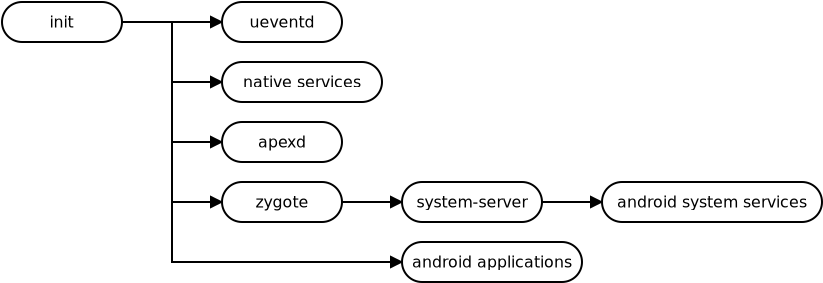
Android’s init is the first user space process, it is responsible for the lifecycle of all services in the system. It uses its .rc configuration files to start ueventd and other native system services. This includes services such as ueventd, apexd and zygote.
These native services are described below.
-
ueventd is primarily responsible for creating device nodes and loading device firmware.
-
apexd is a system daemon required for managing APEX files. APEX files for the purpose of this article can be assumed to be APK equivalent for system packages.
-
zygote is the parent of all Android application and system processes. It spawns the system-server, which is the host process that houses all system services within Android.
Observations
We obtained the bootchart and bootlogs from the system to understand what is happening during the boot process.
A section of the bootchart corresponding to the initial boot is shown below. The bootchart has been masked to protect customer data.
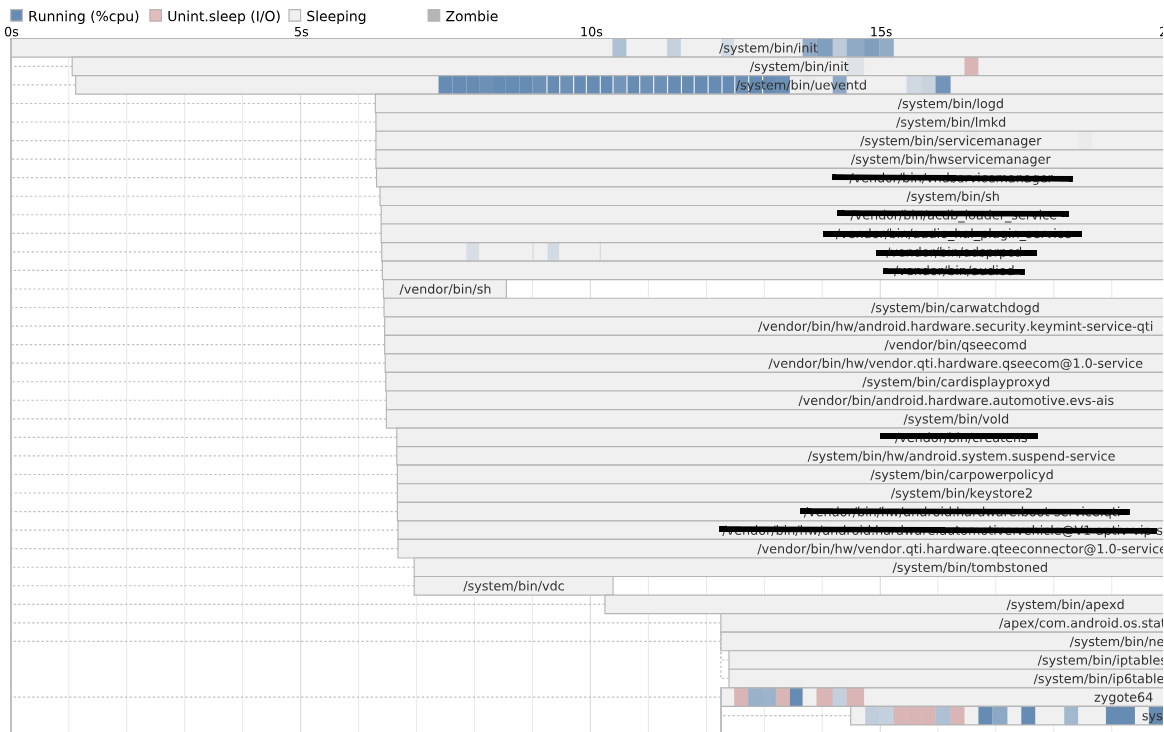
From the bootchart it was clear that a significant amount of boot time was consumed in the following places:
-
Between ueventd and logd start. (5 seconds)
-
Between tombstoned and apexd / zygote start (5 seconds)
But it was not clear what was causing the delay in the boot time. Analyzing the boot logs, we found that several services were failing during the startup.
Here is a message from the Pseudo Random Number Generator
[    1.753526] [  T539] prng_seeder: Hanging forever because setup failed: hwrng.read_exact in new
Caused by:
        : No such device (os error 19)
Another set of error messages from Keystore, responsible for storing crypto keys, indicating it cannot connect to keymint.
keystore2: system/security/keystore2/src/maintenance.rs:192 - Call to earlyBootEnded failed for security level STRONGBOX: system/security/keystore2/src/maintenance.rs:167: getting keymint device.
keystore2: system/security/keystore2/src/error.rs:180 - system/security/keystore2/src/maintenance.rs:167: getting keymint device
keystore2:
keystore2: Caused by:
keystore2:     0: system/security/keystore2/src/globals.rs:335: Cannot connect to Keymint
keystore2:     1: system/security/keystore2/src/globals.rs:246: Trying to get Legacy wrapper.
keystore2:     2: Error::Km(r#HARDWARE_TYPE_UNAVAILABLE)
vold    : keystore2 Keystore earlyBootEnded returned service specific error: -68
Another set of error messages when init tries to mount all block devices. Note that filenames in the log have been masked to protect customer data.
[   10.834045][    T1] /dev/block/xxx: Can't open blockdev
[   10.889519][    T1] /dev/block/xxx: Can't open blockdev
[   10.902428][    T1] /dev/block/xxx: Can't open blockdev
[   10.938332][    T1] /dev/block/xxx: Can't open blockdev
[   10.948011][  T538] init: Unable to set property 'ro.boottime.init.mount_all.default' from uid:0 gid:0 pid:1: Read-only property was already set
[   10.971382][    T1] init: [libfs_mgr] Failed to open '/dev/block/xxx: No such file or directory
[   10.981436][    T1] /dev/block/xxx: Can't open blockdev
[   11.018000][    T1] /dev/block/xxx: Can't open blockdev
[   11.031078][    T1] /dev/block/xxx Can't open blockdev
[   11.072579][    T1] /dev/block/xxx Can't open blockdev
[   11.085354][    T1] /dev/block/xxx: Can't open blockdev
[   11.121789][    T1] /dev/block/xxx: Can't open blockdev
[   11.133160][    T1] /dev/block/xxx Can't open blockdev
[   11.172450][    T1] /dev/block/xxx: Can't open blockdev
[   11.184441][    T1] /dev/block/xxx: Can't open blockdev
[   11.221554][    T1] /dev/block/xxx: Can't open blockdev
Initially, these looked like isolated issues that we debugged and root caused separately. But one pattern emerged from root causing all these issues. Device file creation required for these services was getting delayed.
For example prng_seeder was failing because /dev/hw_random was not available. The mount of /dev/block/* was failing because the corresponding
block device nodes were not available.
To confirm our hypothesis, we ran a script at boot up that would continuously print a list of devices in /dev to a file. We found that device nodes
were being created in /dev well into the boot process. In fact, nodes were being created 12 seconds after kernel start. This turned our suspicion
to ueventd. After analyzing ueventd’s code and adding further debug messages into its execution, we discovered that the delays were tied to SELinux
context restoration processing. At the end of this program analysis the two things were clear:
-
The ueventd had a cold boot wait time, that was delaying init from starting the system services. This was later evident from the Android property
ro.boottime.init.cold_boot_wait after boot-up. It was 4 seconds, which is substantial in terms of boot-up time. -
ueventd SELinux context restoration is very CPU intensive (and hence slow) during boot-up, as is evident from the bootchart between 7th second and 13th second, resulting in delayed creation of device nodes.
What’s Next?
Our analysis of the boot logs pointed us to a few findings that raised more questions than answers. In the next part of this series, we will explain:
-
What is the cold boot wait in ueventd, and why does it take about 4 seconds?
-
What is SELinux context restoration, and how is it connected to ueventd?
-
Why does SELinux context restoration delay the cold boot wait and also cause high CPU usage later in the boot process?
The answers lead to the configuration change that saved 8 seconds in the boot process. Stay tuned for Part 2. If you are working on any similar project involving Android infotainment platform, please write to us at sales@zilogic.com.